Contracts in. Bookable inventory out.
Upload the hotel contract the supplier sent, whether it's a PDF. You check the few fields it isn't sure about, approve it, and the rates are live in search, proposals and your Partner API.
Every hotel writes its contract its own way
Seasons sit in one table and the child policy hides in a footnote. Follow one contract from the inbox to a rate you can sell.
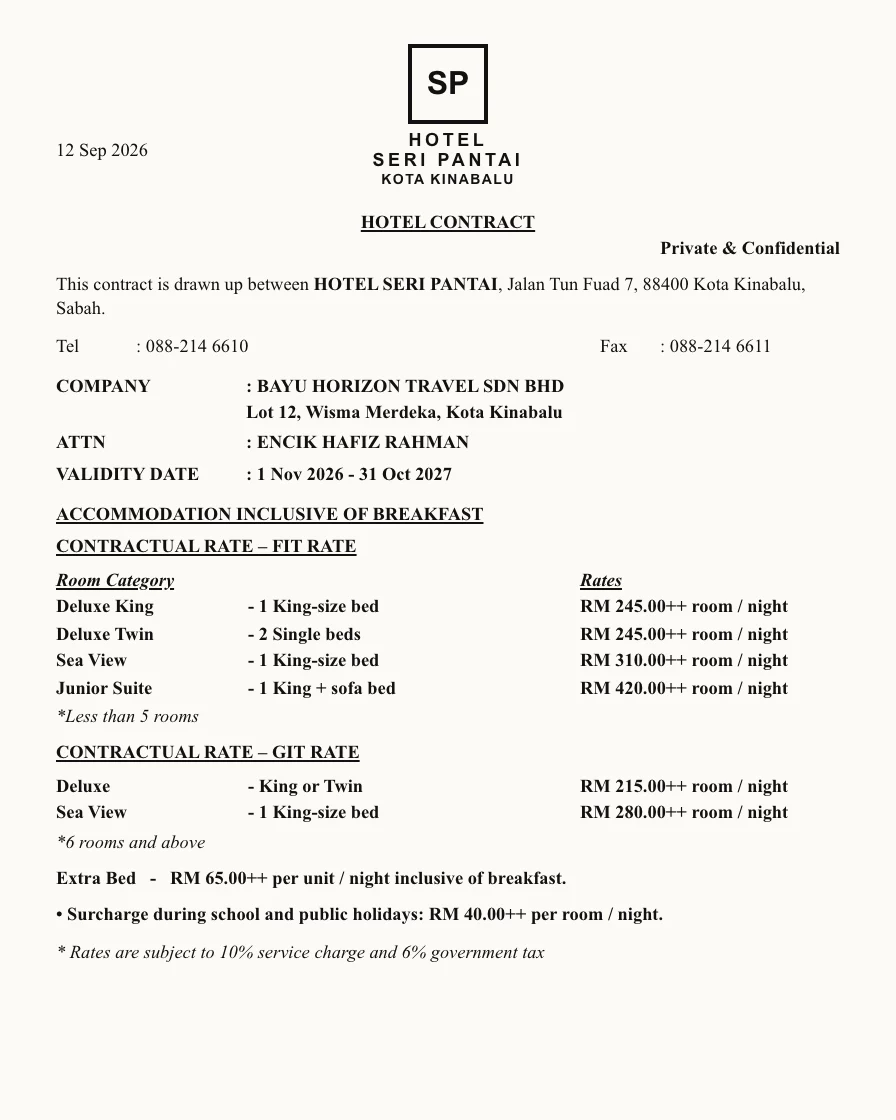
Keep scrolling to crumple the contract, or hold and drag it.
A hotel's contract, read and ready to book
Upload it and its rooms, rates, group terms and taxes become fields your team can quote and book from. Nobody has to look a rate up in the PDF again.
Every price checked against the contract behind it
When rates are retyped into a spreadsheet, mistakes reach the guest. Each card shows one of those mistakes and the rule that now stops it, so the price you quote is the one the hotel agreed.
A rate loaded against the wrong season.
A nine-year-old priced as an adult.
A room sold after the allotment ran out.
A quote that changed because the dollar moved after you sent it.


From the supplier’s file to a rate you can sell
Load the contract once and review only what the extraction flags.
Load it once. Review only what's flagged
Your team checks the handful of fields the extraction is unsure about and skips the rest. Keep scrolling to follow one contract through.
- 1
Upload
PDF, scan, Excel, CSV or Word. Any layout the supplier invented.
- 2
Extract and score
Rooms, seasons, rates, meal plans and policies come out as fields, each with a confidence score.
- 3
Review only the flagged fields
Low-confidence values come to you with the original page beside them.
- 4
Approve
One click. Every change is logged by field with before, after, who and when.
- 5
Bookable
Live in search, proposals and the Partner API. No publishing step.
One price from search to booking
Quotes, proposals and bookings all read from the same approved contract.
Build the quote from the contract
Search your approved contracts for the party in front of you, add options to a proposal and send it. The link shows you when the guest opens it and which option they pick.

Book without overselling

Let partners self-serve
Partner systems search, quote and book your inventory through the Partner API, at sell prices only. A branded partner portal is coming soon.
Let the inbox do the typing
Contracts, quote requests and stop sales go from Gmail or Outlook straight into the platform.
Send emails across without forwarding them
The extension sits inside Gmail or Outlook. Tick the emails you want handled, or turn on inbox watching for a shared address like reservations@.
- 1Pick the emails
Tick the contract, the quote request and the stop-sale notice.
- 2Or connect your centralized inbox to watch
Point it at a shared address like reservations@ and it picks up the emails that matter.
- 3Each one goes to the right place
Contracts go to ingestion, requests to quoting, stop sales to inventory.
From attachment to approved contract
A hotel contract that arrives by email is checked against what you already have before anything is imported.
- 1Review the file
See the contract, who sent it and which hotel it belongs to.
- 2Check for duplicates
If an older version exists you see both and decide which one stays live.
- 3Parse and import in one click
Rooms, seasons, rates, meal plans, offers and charges come out as fields.
- 4Send for approval
A named approver signs it off before the rates go live.
Answer quote requests from the email itself
A partner writes the request the way they always do. The party, dates and meal plan are read from the text and priced against your hotel contracts.
- 1Read the request
Party, ages, dates, destination and meal plan are pulled from the email.
- 2Run your rules
You decide which requests can go out without a person looking first.
- 3Price and send
The proposal is priced from your contracts and sent with your branding.
Close dates the moment a hotel tells you
When a hotel emails to say rooms are unavailable, the notice is read and, once someone confirms it, those dates are closed in your inventory.
- 1Read the notice
Hotel, room type, dates and reason are taken from the email.
- 2Close the dates
Those nights become unavailable in inventory.
- 3Nobody can sell them
Search, proposals and the Partner API stop selling the rooms for that window.
Ask for it in plain words
The assistant answers from your contracts and shows each person only what they are allowed to see.

Search and compare
Rates come from your approved contracts, priced for the party you typed, with cancellation terms side by side.
Start the paperwork
Turn the options you like into a draft proposal, then check and send it yourself.
Stays inside your permissions
It only sees what the signed-in user can see, and every action it takes is in the audit log.
What it saves you
Your team spends its time on the fields that need a person, and your partners get answers sooner.
the cost to process a contract
Compared with keying it in by hand. You pay for the scan, and your team only touches the fields that need a person.
Less manual work
Your team reviews the flagged fields instead of typing every rate, season and policy.
Faster workflows
Quotes are priced from live contracts, so nobody waits for a spreadsheet to be updated.
Day-to-day tasks on autopilot
Contracts, quote requests and stop sales arrive by email and get handled from there.
An AI agent for the rest
Ask for options, comparisons or a draft proposal in plain words.
See what the extraction did, field by field
Each field shows how sure the extraction was. Each contract gets a diagnostics report, each edit is logged with who made it and when, and every contract scan is counted against your AI credits.
See roles, SSO and audit on the platform pageExtraction diagnostics
Field confidence
AI credits

Connect it to the systems you already use
We scope each connection with your team and test it on your own data before switching it on.
Connect your CRM, channels and back office
Connections to Sabre, Pipedrive, Safari Portal, Sejour, Tour Plan and your back office or CRM are scoped with you on request, then built and tested on your own data.
See how an integration gets connected- Sabre
- Pipedrive
- Safari Portal
- Sejour
- Tour Plan
- WhatsApp Business
- Telegram
A working session on your workflow: which system, which events, which fields, who owns them.
Field mapping, currencies and dates normalised, every test record logged with pass or fail.
Your ops lead and IT sign off by name. Every event and retry is visible afterwards.
What contracting teams tell us
From teams who sent us the contract they least wanted to load.
We sent the Azure Cove contract on purpose. Five seasons, a child policy in a footnote, cancellation tiers on another page. It came back with a short list to check, and two of those were mistakes we had been quoting for a year.
Stop-sale emails used to wait in a shared inbox until someone noticed them. Now they are read, confirmed and closed the same morning.
Bring the contract nobody wants to load
Send it before the call. We load it while you watch and build a quote from it.